


 ClipUp
Introduction
ClipUp extends your clipboard with some nice features:
- It remembers the last clips (up to 100).
- After rebooting all clips and the clipboard are restored.
License
ClipUp is freeware. For details read the enclosed documentation.
Usage
Use your clipboard as usual. When you click onto the icon in the Deskbar or Press COMMAND+SHIFT+V a pop-up menu appears:
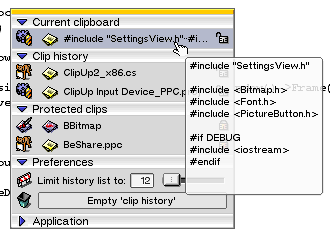
As you can see, the menu is divided into several parts:
- Current clipboard: The current content of your clipboard
- Clip history: Here you find the last clips that you’ve had in your clipboard.
- When you click a clip, it becomes activated (or will be pasted into the current application - see below).
- When you click on the lock it will be protected (see below).
- When you press the Delete key on your keyboard, it will be removed.
- Protected clips: You can set a limit for the amount of clips that are held in the clip history. Protected clips are stored in the ‘Protected clips’ list and will not be deleted when the limit is reached.
- Preferences, Application: Should be clear
When you’ve installed the input server add-ons (default) and you press CTRL+SHIFT+V, the pop-up menu appears on the screen. When you now select a clip, the selected clip will be pasted into the current application.
If you like ClipUp, please vote for it at BeBits!
History
- November 16, 2002 Source code released
- April 29, 2002 V2.0.3: Now the system font is used. This improves the representation of non-ASCII chars
- January 28, 2002 V2.0.2: Fixed the non-working keyboard control.
- January 27, 2002 V2.0.1: Fixed the “Focus Follows Mouse” problem.
- January 23, 2002 V2.0: The completely rewritten application adds some nice features:
- Bubble help shows the complete (text) clips
- An icon tells you from which application the clip came
- Protect frequently needed clips from removal
- Enjoy a brand new animated GUI (do you like it?)
- Store up to 100 clips
- September 20, 2001: V 1.1: Some work:
- Added support for SHIFT+CTRL+V [pop-up menu and direct paste]
- Added “limit history” menu
- Now duplicate COPY adds the clip only once to the history
- Removed a minor bug
- September 16, 2001: Initial release.
Download
- ClipUp x86 [119 kB]
- ClipUp PPC [73 kB]
- ClipUp Source [104 kB]